
The problem with law firm websites
Most solicitor and legal consultant websites are built for one audience: other lawyers. They are full of credential lists, extensive team bios, practice area overviews six levels deep, and pages of boilerplate copy that says nothing memorable.
The person actually looking for a legal consultant - a founder whose supplier just breached a contract, a director facing an employment tribunal, a startup about to sign a term sheet they don't fully understand - does not want to read about your firm's history. They want to know: can you help me, how much will it cost, and can I trust you? They want to know that in about 30 seconds.
A traditional law firm website is built for credibility. A landing page is built for action. For getting new business clients, action wins.
The distinction matters most when you're driving paid traffic (Google Ads, LinkedIn) or sending cold email. Every click costs money or effort. Sending that traffic to a homepage with navigation and 12 competing calls to action is a waste. A landing page with one goal - book a call - converts 3-5x better from the same traffic source.
A real example: Meridian Legal
Below is a live page built on lander.rs for a fixed-fee UK legal consultancy. Visit it at lander.rs/legal-consulting.
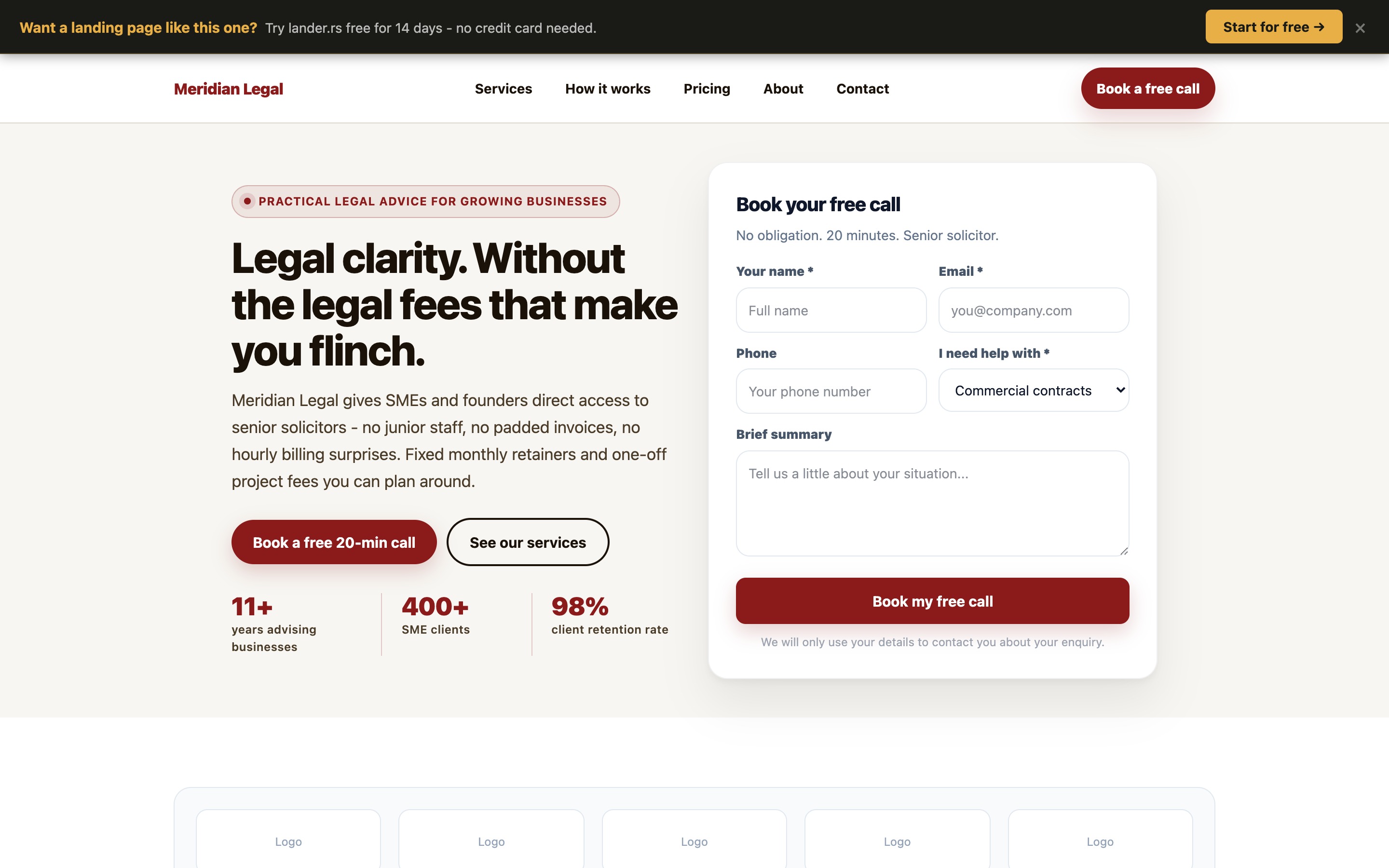
Desktop view (1440px) — above the fold
The first screen a business owner sees immediately answers the three questions that matter:
- "Can you help me?" - the headline ("Legal clarity. Without the legal fees that make you flinch.") signals practical help for cost-conscious SMEs, not big corporate law
- "How much will it cost?" - the sub-copy explicitly says "fixed monthly retainers and one-off project fees you can plan around" - billing anxiety resolved before they scroll
- "Can I trust you?" - three specific stats (11+ years, 400+ SME clients, 98% retention) with social proof that is concrete rather than vague
The form is in the hero itself - the most valuable real estate on the page. A visitor can book a free call without scrolling at all on desktop.
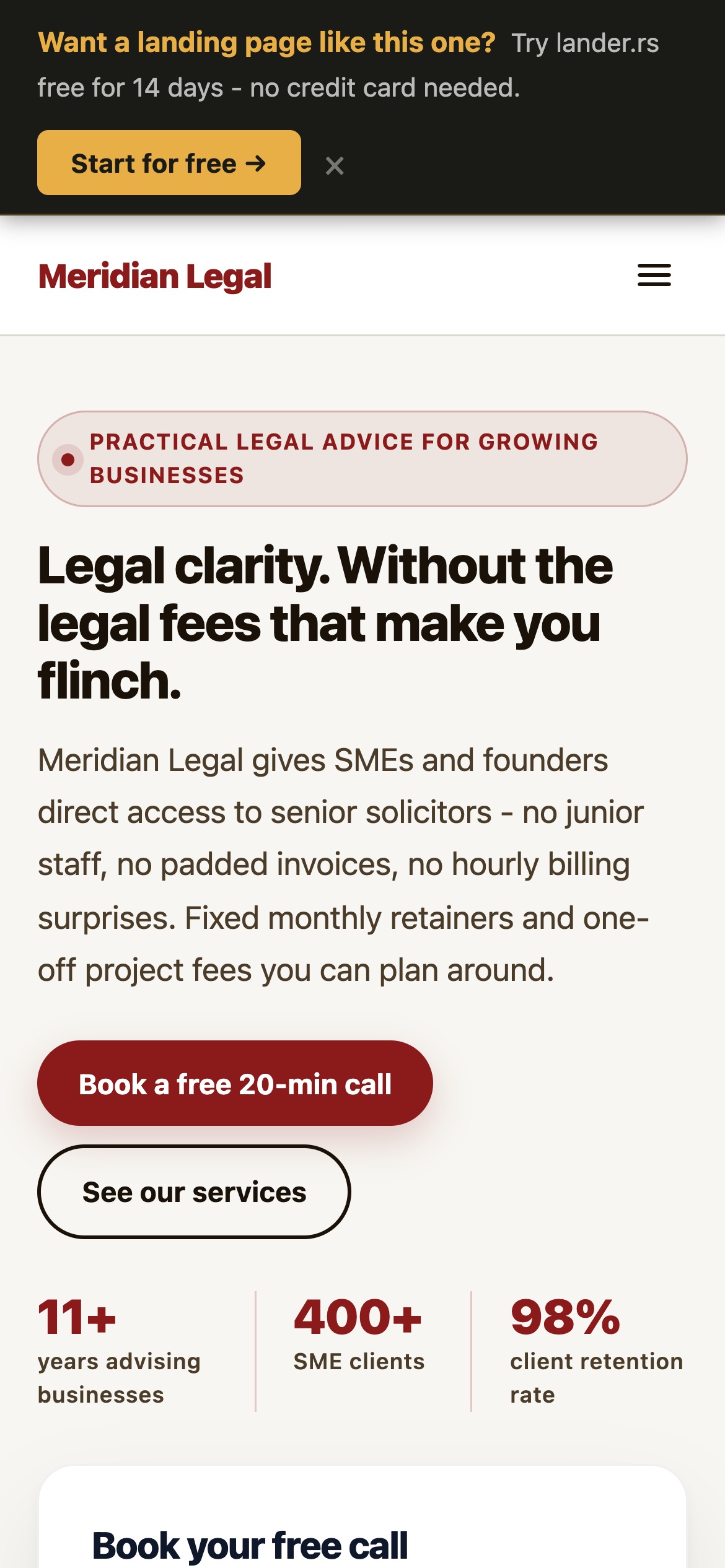
Clean mobile experience
The headline and CTA are above the fold on mobile. No pinching, no horizontal scroll, no menu hunting. The warm parchment palette reads as professional without being cold.
No navigation clutter
The header has one CTA ("Book a free call") not a multi-level menu. Every element on the page points toward the same action.
Mobile view (iPhone 14 Pro, 390px)
What makes a legal consulting page convert
1. Lead with the client's problem, not your credentials
The instinct for most legal professionals is to open with qualifications: "Qualified solicitor with 11 years of experience..." That belongs further down the page, in the About section, where it provides reassurance to someone already interested.
The headline slot - the most-read text on the entire page - should speak to the pain the client is feeling. "Legal fees that make you flinch" is a real emotion that every SME founder has experienced. It creates an immediate sense that this firm gets them.
2. Name the fear: billing unpredictability
The number-one reason small businesses avoid instructing solicitors is not cost - it is unpredictability of cost. An open-ended hourly engagement feels like a taxi with no meter visible. Your landing page should directly name and neutralise this fear above the fold.
Phrases like "fixed monthly retainers", "no hourly billing surprises", "you agree the scope before any work starts" are not just selling points - they are objection removers. Put them early.
3. Make the free consultation frictionless
The goal of the page is not to close a client - it's to get a call booked. The Meridian page asks for name, email, phone, topic, and a brief summary. Five fields. The form title is "Book your free call", not "Contact us" or "Submit enquiry." Language matters: booking a call implies value; submitting an enquiry implies paperwork.
4. Use process to reduce perceived complexity
Legal matters feel daunting because people don't know what happens next. A clear three-step process section ("Free 20-minute call → Clear scope and fixed fee → Direct access to your solicitor") replaces the unknown with a predictable path. This dramatically reduces hesitation.
5. Specificity beats authority
Testimonials that say "excellent firm, very professional" are background noise. The Meridian page uses specifics:
- "James reviewed our investor term sheet within 48 hours and flagged three clauses that would have cost us dearly."
- "We had a settlement agreement dispute that had been dragging for months. Meridian resolved it in three weeks without going to tribunal."
Specific outcomes, specific timeframes, specific situations. That is what a business owner reads and thinks: that sounds exactly like my problem.
How to present your fees on a landing page
The instinct to hide pricing is understandable - you don't want to lose a lead before you've had the chance to explain the value. But for legal consulting aimed at SMEs, hiding fees is a conversion killer.
Business owners are busy and suspicious. If they can't quickly gauge whether you're in their budget, they bounce. The ones who stay and book a call have already self-qualified - they know roughly what to expect, and they're interested anyway. Your conversion rate on those calls will be much higher.
The Meridian pricing section uses three monthly retainer tiers (Essentials from £295/month, Growth at £595, Partner at £1,195) with a clear note: "All retainers are monthly rolling - no lock-in contracts." This removes the final commitment anxiety and makes it easy to start at the entry point and grow.
Pricing approaches that lose leads
- "Contact us for a quote"
- Hourly rates only, no ceiling
- No pricing page at all
- Vague "competitive rates"
Pricing approaches that convert
- Clear monthly tiers with names
- Featured "most popular" plan
- Fixed project pricing with examples
- "Monthly rolling, no lock-in" stated explicitly
Building trust without big brand names
A BigLaw firm can coast on its reputation. A boutique legal consultancy cannot. Trust must be built on the page itself, and it needs to be done quickly. Here's how the Meridian page does it:
Regulatory credentials above the fold
"SRA regulated. Full professional indemnity insurance." - this appears in the How It Works section alongside the process steps. It's not buried in a footer footnote. Business owners, especially those who've been burned before, look for this signal actively.
The founder's story matters
The About section on the Meridian page doesn't just list qualifications - it says James "co-founded and exited a professional services business." This single sentence does enormous trust work. It signals that the solicitor understands the decisions founders face from the inside, not just as an external adviser.
Sector specificity over general practice
The Companies section lists the sectors served: Tech, Recruitment, Professional services, E-commerce, Hospitality. A founder in any of those sectors immediately thinks "they know my world." Claiming expertise in everything signals expertise in nothing. Narrow to the sectors where you do your best work.
Six testimonials, not one
One glowing testimonial can feel cherry-picked. Six testimonials from different industries (SaaS, recruitment, e-commerce, digital agency, hospitality, tech consultancy) feel representative. Include the client's role and company type - that specificity makes each testimonial credible to the reader who matches that profile.
lander.rs vs the alternatives
| lander.rs | Web agency | WordPress / Wix | |
|---|---|---|---|
| Time to live | Under 1 hour | 4-12 weeks | Days to weeks |
| Cost | From $15/month | $3,000 - $15,000 | $16 - $50/month + plugins |
| AI page generation | Yes - describe your firm, get a full page | No | Basic / paid add-on |
| Legal-specific components | Yes (pricing tiers, testimonials, process, FAQ) | Custom build | Generic templates |
| Edit without a developer | Yes - drag-and-drop | Usually requires developer | Yes but limited |
| Form-to-email lead capture | Built-in, no plugins | Custom integration | Plugin required (paid) |
Why not just use a website builder?
Wix and WordPress are good general-purpose tools. The problem is that "general purpose" means the default is a website, not a landing page. You have to actively fight the platform to remove navigation, simplify the structure, and focus on a single conversion goal. On lander.rs, that's the starting point - not something you have to configure away.
The AI generation advantage
The most time-consuming part of building a landing page is writing the copy. lander.rs's AI generation lets you type a description of your practice - something like "UK commercial solicitor, 10 years experience, fixed-fee retainers for SMEs, specialising in employment law and contracts" - and get a fully populated, correctly structured page in about 60 seconds. You edit, adjust the numbers, and publish. The whole thing takes less time than writing the brief to send to an agency.
Build your legal consulting landing page
Register free
Free forever, no credit card. Full access from day one.
Generate with AI
Describe your practice in plain language. The AI generates a complete page - hero, services, testimonials, pricing, FAQ, contact form - in under a minute.
Add your real numbers
Swap in your actual years of experience, real client count, real pricing tiers, and genuine testimonials. Specific numbers convert; generic ones don't.
Connect a domain and publish
Point your domain at the page (e.g. enquiries.yourlawfirm.co.uk), hit publish, and send traffic. Form submissions land directly in your inbox.
See what your firm's page could look like
Free forever. No credit card. The legal consulting template is available from day one.